
How to stop Claude Code asking for permission every time
Four ways to stop the prompts, and why auto-accept edits still halts on commands. Which one to pick, and how a long run keeps going while you are away.
You give Claude Code a real job — refactor a module, run the suite, fix what breaks, push the branch — and then you watch it stop. Not because it failed, but because it has reached something it will not do without you, and it needs you to say yes.
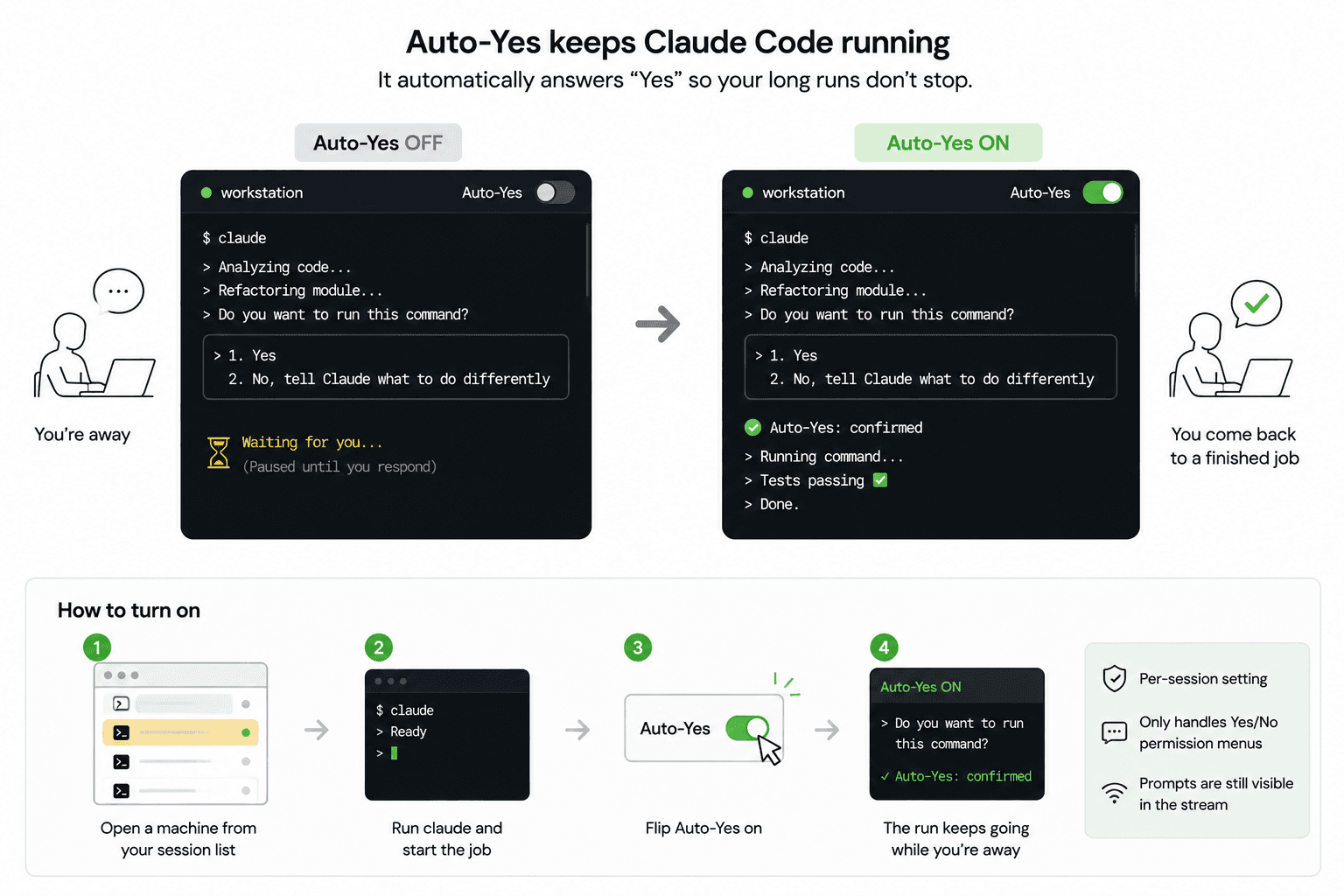
  Do you want to run this command?

  ❯ 1. Yes
    2. No, tell Claude what to do differently
Sitting there pressing Enter is fine when you are at the desk. It is useless when you have gone to a meeting, because the agent will wait for you the entire time. You come back an hour later to a run that stopped in the first two minutes.
Why does Claude Code keep asking for permission?
Because it asks before doing anything it has not been approved for — and how much is approved up front depends on which permission mode the session is in.
On Pro, Max, and Team plans, Claude Code now starts in auto mode, where a second model reviews each action instead of you and stops only for the ones it judges worth a human. In manual mode — one press of Shift+Tab away, and where sessions start otherwise — almost nothing is pre-approved, so you are asked before essentially every command.
Either way the shape of a long job is the same. Claude reads your code without asking, but the moment it wants to act it may put a decision in front of you, and every new command is a new decision. It is not repeating one question; it is asking a different one each time.
And in every mode there is a floor. Some actions are never auto-approved — writes to protected paths, and anything you have written a deny rule for. Auto mode makes the questions rarer. It does not make them stop.
So there is no single switch that makes the question go away forever. There are four different trades you can make, and they are not interchangeable.
Last checked against Anthropic's permission-modes documentation on August 25, 2026. Claude Code changes quickly — read theirs before you decide, rather than trusting a blog post, including this one.
The four ways to stop it
1. Let auto mode decide. A classifier reviews each action and only escalates what it thinks needs you. If you are on a paid plan you are probably already in it. For a lot of work this is the whole answer, and nothing below is worth doing — but it decides which actions need a human, not whether a human is there.
2. Approve things ahead of time. Claude Code can remember approvals, so a command you have already blessed stops asking on the next run. This is the narrowest option and the safest one. It is also the slowest to pay off, because you are still answering the first prompt for every new kind of command.
3. Turn off the prompts at launch. Claude Code has a flag that skips permission prompts entirely for that session. It works, and Anthropic scopes it to isolated containers and VMs. What you give up is discussed further down.
4. Answer the prompts automatically, without removing them. This is what TermLink's per-session approval setting does, and it is the option that exists because of the meeting problem: you are not at the keyboard, but you still want the prompts to be real.
Those last two are the only ones that address being away, and they answer it differently. The first three are all decisions you make before the run about what deserves a question. This one is about what happens when the question arrives and the chair is empty.
Letting the session answer for you
TermLink answers those prompts for you, per session. A Claude session carries an approval setting with three positions — Ask for everything, Allow file edits, Allow commands and edits — and the host answers whatever the position you picked covers.
That is the whole feature. The agent asks, TermLink answers, the run keeps going. You go to your meeting and come back to a finished job instead of a blocked one.
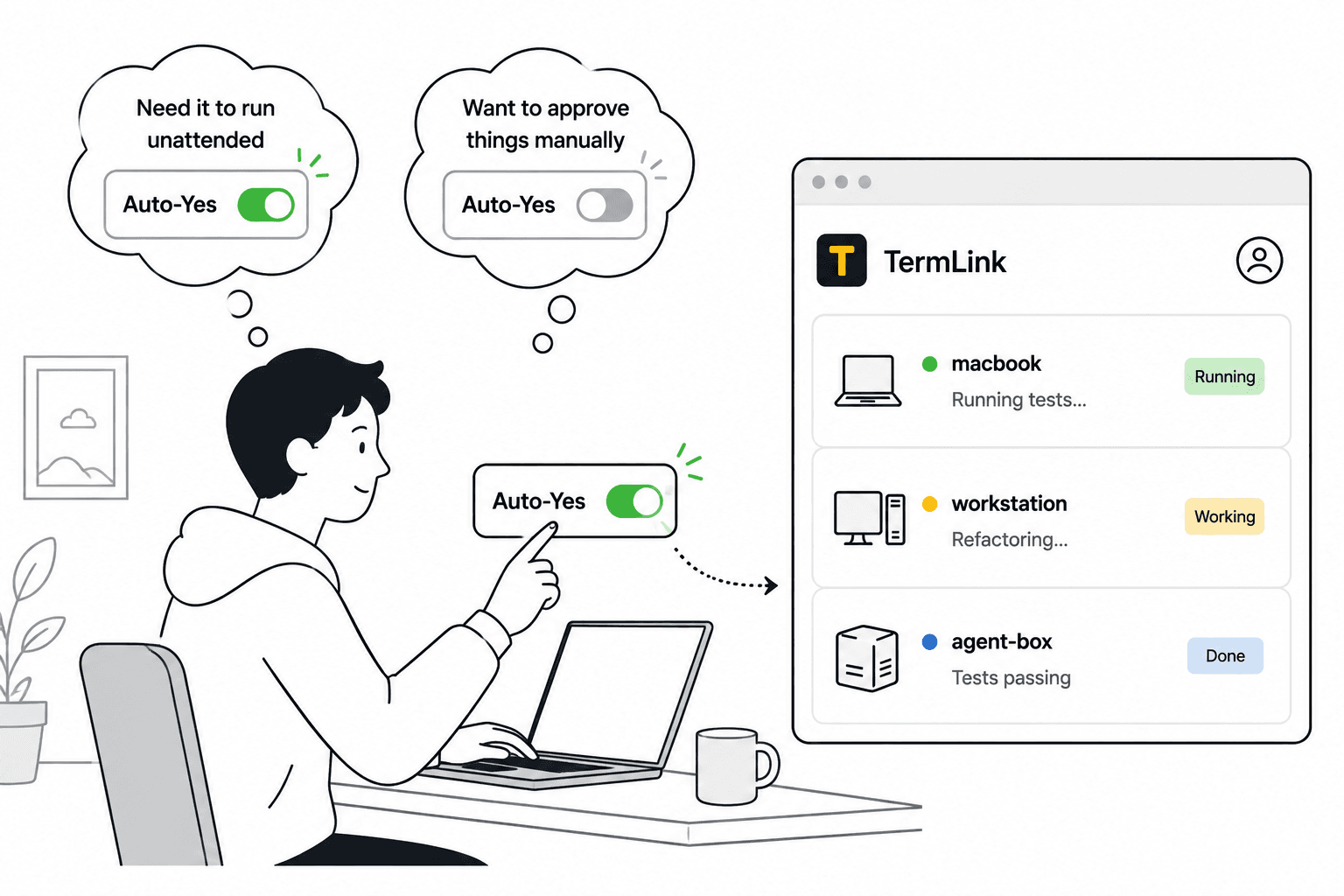
It is scoped to one session — turning it on for the refactor running on your workstation does not turn it on for the agent on your laptop.
One detail worth knowing before you rely on that. A new Claude session starts at Ask for everything unless the machine's host was started with --auto-approve edits or --auto-approve all, in which case it starts there instead. A plain terminal session has the older Auto-Yes switch, and that one inherits whatever you set last in that browser — the app says so at the time, with a notice reading New sessions default to Auto on. Either way, before a migration or a deploy, check what the session is currently set to rather than assuming a fresh one starts clean. The exact behaviour is on the Auto-Yes reference.
What it does not do
This matters, so it is worth being blunt about it: automatic approval is a convenience, not a safety feature.
- It does not read the command Claude is about to run and form an opinion about whether that is a good idea. It answers the kinds of approval you said it could answer, and that is the whole of the judgement involved.
- It takes the plain allow. Where Claude offers a wider "yes, and stop asking for the rest of this session" line next to the single yes, TermLink does not pick it.
- A question is not an approval. If Claude asks you which of two approaches you want, or puts a plan in front of you, the session waits for a human in every setting. That is deliberate.
So the rule of thumb is the boring one. Loosen the setting for work whose blast radius you already accept: a test run, a refactor inside one module, a build. Put it back on Ask for everything when Claude is touching anything you would want to look at before it happens — migrations, deletions, deploys, anything against production.
"I turned on auto-accept edits and it is still asking"
This one catches people, and it is not a bug.
Auto-accepting edits and auto-approving commands are two different things. Edit mode covers Claude writing to files, plus some ordinary filesystem work inside the folder it is working in — mkdir, mv, cp and friends.
What it does not cover is everything else you actually run. On a real job the thing that blocks you is almost never the file write. It is npm test, git push, the migration, the build — and unless you have added an allow rule for those specifically, they still stop and ask.
So the session goes quiet on edits, you assume you are unblocked, you walk away, and you come back to a run that stopped at the first shell command anyway.
If that is the symptom you have, the fix is not another edit setting. You need something that answers the command prompts too — either the launch flag, or a session set to Allow commands and edits so they are answered while you are gone.
Why not skip permissions entirely?
Claude Code has its own flag for skipping permission prompts entirely, and Anthropic is direct about where it belongs: isolated containers and VMs. If that is your setup, use it — but notice what you give up outside one: the prompts stop existing at all, on that machine, for that whole session, whether or not you are watching.
Auto-Yes is a different trade. The prompts still exist. You can watch them scroll by. You can put the session back on Ask for everything the moment the agent starts doing something you would rather approve by hand, and the very next prompt waits for you again. It is a dial you keep your hand on, not a switch you flip at launch and forget.
The practical difference shows up when you change your mind. With the flag, changing your mind means restarting the session. Here it means one tap on a phone.
Turning it on
The setting lives in the session header:
- Open the machine from your session list in the web client.
- Start a Claude session and give it the job.
- Move the approval setting off Ask for everything. Allow file edits covers edits only; Allow commands and edits covers the shell commands too.
A plain terminal session works differently — it has a single Auto-Yes switch that confirms a highlighted Yes or Allow on screen. Both are written up here.
Two things neither one will answer: a question the agent is asking you, and a plan waiting for your approval. When it does answer, it takes the single allow rather than the wider "stop asking for this session" option sitting next to it.
Because this lives in the browser rather than in the terminal on your desk, you can also flip it from a phone — which is the actual point. The moment you realise the agent is going to sit there for an hour is usually the moment you are already somewhere else. See using Claude Code from your phone for what that looks like.
And when the run finishes?
TermLink can tell you, if you turn notifications on in Settings. After the browser grants permission you get a desktop notification when a session finishes a run or starts waiting for your input. It's a browser notification rather than push, so it needs a TermLink tab open somewhere and it won't reach a locked phone, and there's no email. With it off you get the glanceable list instead: every machine you have registered shows that session's most recent Claude message on its card. One line each. Either way you can tell which agent is still working and which one is sitting there waiting on a question Auto-Yes deliberately did not answer.
That is usually enough. Open the tab, read four lines, and go to the one that needs you.
If you are running more than one agent at a time, that list is doing more work than it looks like — see running several Claude Code agents at once.
Frequently asked questions
Why does Claude keep asking for permission on every command?
Because each command is a separate approval. Claude Code asks before it acts, and it has no memory of an approval you have not given it yet, so a long job with many different commands produces many different prompts.
Can I make Claude Code stop asking permanently?
Not with one setting, no. Auto mode — the starting mode on Pro, Max, and Team plans — already asks you about far less, but it still stops for the actions its classifier judges worth a human, and some actions are never auto-approved in any mode. Beyond that you can pre-approve specific commands, skip prompts for a whole session with Claude Code's own flag, or answer them automatically with Auto-Yes. Each is a different trade between speed and oversight.
Is auto mode enough on its own?
For a lot of work, yes. If you are at your desk, auto mode handling the routine actions and stopping you on the rest is usually all you want. Where it runs out is when nobody is at the desk: auto mode decides which actions need a human, not whether one is there. The prompt it correctly stops on will sit unanswered for as long as you are gone.
Is auto-approving permissions safe?
It is as safe as the work you point it at. TermLink approves without reading the command, so it is fine for a test run or a scoped refactor and a bad idea for migrations, deletions, or anything touching production. Put the session back on Ask for everything before those, not after.
Does it answer every prompt?
No. On an agent session it answers only the kinds your setting covers — file edits, or commands and edits too — and it takes the plain allow rather than the wider "stop asking for this session" option. A question the agent asks you, or a plan it wants approved, always waits for a human. On a terminal session the Auto-Yes switch confirms a highlighted Yes or Allow and leaves free-form questions alone.
Why is Claude Code still asking after I enabled auto-accept edits?
Because edit auto-accept covers file edits and some filesystem commands, not the rest of what an agent runs. A build, a test run, a deploy still asks unless you have added an allow rule for it — and those are usually the prompts that actually block a long job. See the section on auto-accept edits above.
Do I need SSH or a VPN to use this?
No. TermLink connects out from your machine, so there is no inbound port to open and no VPN to dial. See TermLink vs SSH, tmux, and remote desktop.
Automatic approvals are free on every plan. See running Claude Code on a remote machine for the setup it slots into, or get started in about two minutes.
TermLink keeps your agent running on your own machine and gives you the terminal from anywhere. Register a machine and open its session from any browser. Free plan, no card.