
How to run Claude Code on Windows (and why TermLink picks cmd.exe)
PowerShell eats the Esc key that Claude Code needs, so the TermLink host defaults to cmd.exe on Windows. What that means for your sessions.
TermLink hosts run on macOS, Linux, and Windows — a Windows workstation is a perfectly good machine to leave an agent working on, and you can check on it from a Mac, a phone, or a browser you have never signed into before.
There is one Windows-specific decision worth explaining, because if you did not know about it you would file it as a bug.
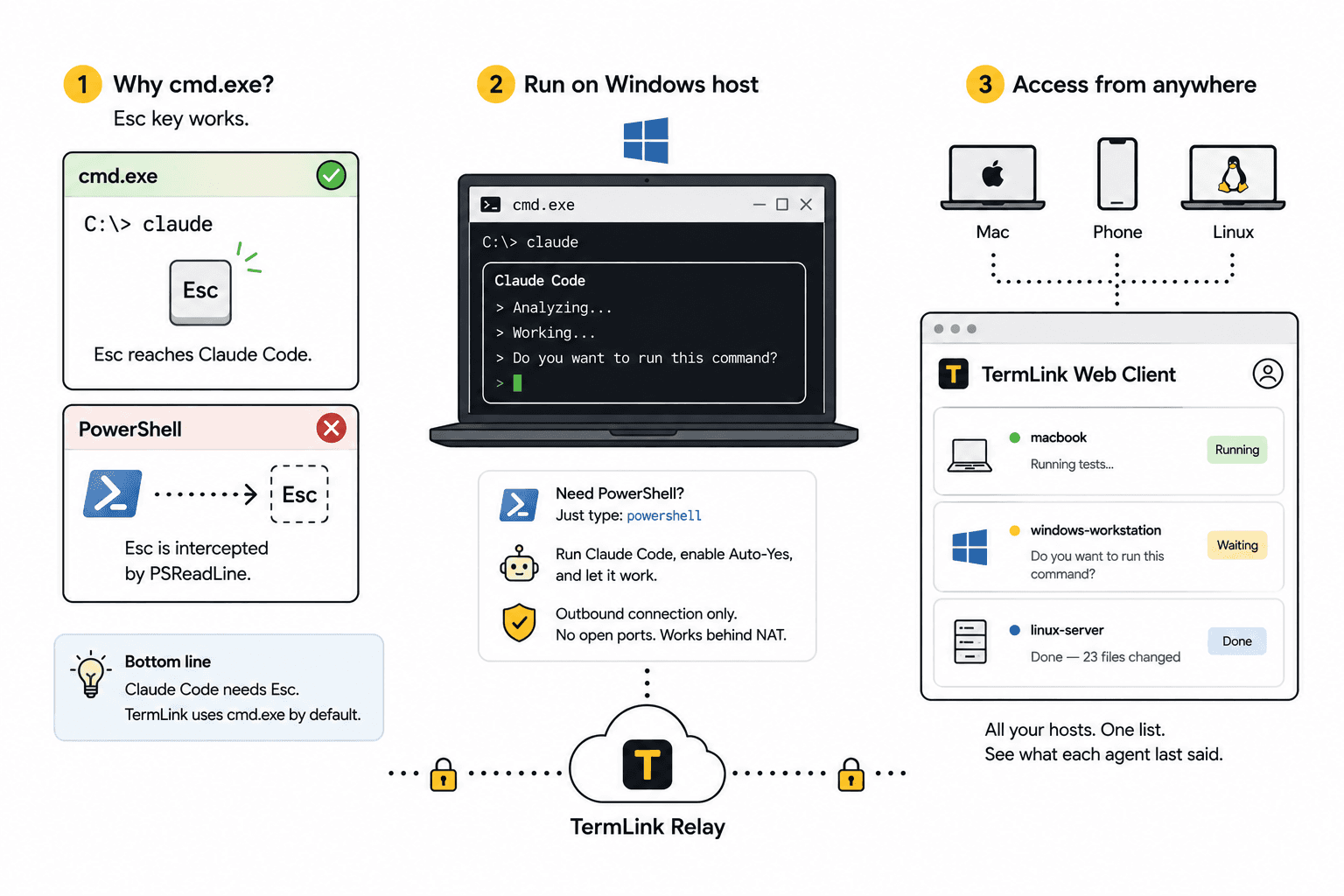
The host defaults to cmd.exe
Not PowerShell. The reason is a single key.
Claude Code draws a full-screen terminal UI, and that UI depends on Esc — it is how you cancel a prompt, back out of a menu, interrupt what the agent is doing. In PowerShell, PSReadLine (the line-editing module that gives you history and completion) intercepts the Esc key for its own purposes. The keystroke gets swallowed before it reaches the program you are running.
The result is an agent you cannot back out of. So the TermLink host opens cmd.exe by default, where Esc arrives where it is supposed to.
This is not a TermLink quirk — it is why terminal UIs in general behave strangely under PowerShell. TermLink just declines to ship the broken default.
You still have PowerShell
cmd.exe is the shell the session starts in. Type powershell and you are in it, like any other command. Run your build, do your thing.
The recommendation is narrow: run the interactive agent — the thing with the TUI and the Esc key — in the default shell, and treat PowerShell as one more program you can launch inside it.
The rest is the same
Everything else on Windows works the way it does anywhere else:
npm install -g @termlink/cli
termlink login
cd ~/work
termlink start
That cd line is the one to be exact about. A session can only open inside the folder you ran the host in, so cd into the project first and that is the range you get when you connect from your phone.
The machine registers under your Google account and dials out to the relay, so it sits happily behind a home router or a corporate firewall with no inbound port and no firewall exception to argue for. Open TermLink in a browser, start a Claude session, loosen its approval setting if the job is one you trust, and go.
Reaching a Windows box from anything else
The client is a browser. A Mac, a Linux laptop, a phone, a machine at the office — open the web client, sign in, and the Windows host is in your list next to everything else. Mixed fleets are the normal case, not the exotic one: a Mac laptop, a Windows workstation, a Linux server, all in one list, each card showing what its agent last said.
Frequently asked questions
Does Claude Code work on Windows?
Yes, and a Windows workstation is a fine machine to leave an agent working on. The one thing to know is which shell you start it in — see below.
Why does the Esc key not work in PowerShell?
PSReadLine, the line-editing module that gives PowerShell its history and completion, intercepts Esc for its own use. The keystroke never reaches the program you are running, so a full-screen terminal UI loses the key it uses to cancel and back out. This affects terminal UIs generally, not just Claude Code.
Can I still use PowerShell?
Yes. cmd.exe is only where the session starts. Type powershell and you are in it, like any other command. The narrow recommendation is to run the interactive agent in the default shell and treat PowerShell as a program you launch inside it.
Do I need WSL?
No. The host runs on Windows natively. If you prefer to work inside WSL you can — it is a shell like any other — but nothing about TermLink requires it.
Can I reach a Windows machine from a Mac or a phone?
Yes. The client is a browser, so the Windows host sits in the same list as your Mac and Linux machines. Mixed fleets are the normal case — see managing multiple Claude Code sessions.
Do I need to open a firewall port on Windows?
No. The host dials out to the relay and never listens, so there is no inbound rule to add and no exception to argue for with IT. Details on how it works and security.
Full walkthrough: getting started with TermLink. For the wider picture, Claude Code remote access.
TermLink keeps your agent running on your own machine and gives you the terminal from anywhere. Register a machine and open its session from any browser. Free plan, no card.