
Running multiple Claude Code agents at once, across machines
Keeping three or ten Claude Code agents in one list across your laptop, workstation, and agent box, and telling which one is waiting on you.
One agent is a tool. Three agents is a management problem.
The moment you are running Claude Code in more than one place — a refactor on the workstation, a test suite on the laptop, something long and boring on a server that exists only to run agents — the hard part stops being can I reach it and becomes which one needs me right now.
The ways to run several at once
Claude Code does a lot of this on its own now, and it is worth knowing where that line falls before you add anything to it.
Its own documentation lists five ways to work on several tasks at once — subagents, agent view, agent teams, dynamic workflows and projects — plus worktrees, which give each session a separate git checkout so parallel work never edits the same files, and cross-session messaging, which lets sessions pass findings between machines. Some of those are still settling: agent view is a research preview, agent teams are experimental and off by default, and projects are a public beta on Pro and Max. Last checked September 28, 2026.
Outside Claude Code the older answers still work and often win on effort. Several terminal tabs is the zero-setup version. tmux keeps sessions alive after you disconnect. Both are covered in TermLink vs SSH, tmux, and remote desktop.
What none of that changes is a line on Anthropic's own page: "In every approach the workers are Claude sessions." TermLink relays the terminal rather than the agent, so the list is not limited to one of them — Codex CLI, Cursor Agent, Copilot CLI and a plain shell sit in it the same way, each with its own approval setting.
One thing holds whichever route you take: running several at once multiplies token use. Anthropic says so on that page, and it is the constraint most people meet before they meet any other.
This is what the terminal-relay version looks like in practice. For the mechanics of it, see managing multiple Claude Code sessions.
Every session in one list
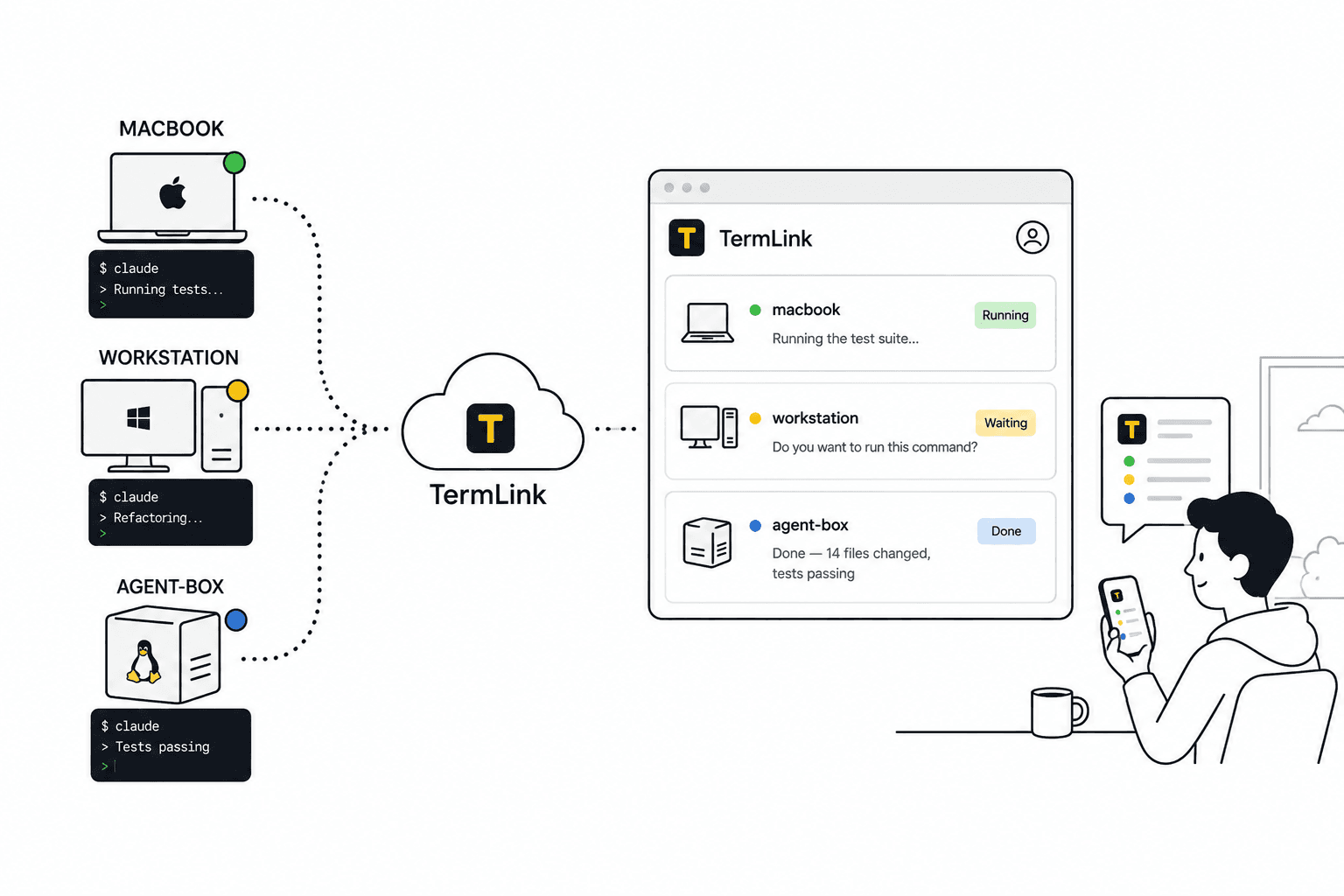
Register as many machines as you like. Run termlink start on each, and every one of them shows up under your Google account, in a single list in the web client.
Switch between them the way you switch between chats. Whether the sessions live on one machine or ten makes no difference to the list.
The line that does the work
Each card in that list shows the agent's most recent message on that session. One line, per machine:
● macbook        ● Running the test suite…
● workstation    ● Do you want to run this command?
● agent-box      ● Done — 14 files changed, tests passing
That is the whole triage surface, and it is enough. Read three lines and you know that the laptop is busy, the workstation is blocked on a question, and the server finished while you were away. You go to the one that is waiting.
Without it you would be opening three tabs and reading three screens to learn the same thing.
Set the ones you trust free
Each session carries its own approval setting. Move the ones whose work you already accept — the test run, the contained refactor — up to Allow commands and edits, and those agents stop coming back to you for permission at all. Leave the one doing something you want to see first at Ask for everything.
Now the list sorts itself. The loosened sessions grind away without you; the ones that surface a question are the ones actually asking for a human.
Machines that only run agents
A headless box is the natural home for a long agent job, and it is exactly the machine that remote desktop tools cannot help you with — there is no desktop session to stream. TermLink does not need one. termlink start on the server, a Claude session started from the browser, and you check on it from your phone like any other session.
The host dials out, so the box can sit behind NAT with no port open and nothing listening.
What to expect
- The cap is on active sessions, not on viewers: Free runs four at a time, Pro runs twelve and Max runs forty, so a larger fleet needs a paid plan. Either way you can watch from as many browsers and phones as you like.
- Every session within the cap streams live, with no session time limit and no reconnect wait — on Free as well as Pro. Sessions are the only thing the plans differ on.
- Notifications are opt-in and browser-based. Turn them on in Settings and a desktop notification fires when a session finishes or starts waiting. They need a tab open somewhere; there's no push or email. With them off you glance at the list, which for a fleet is often the faster habit anyway.
- The
termlink startprocess has to stay running on each machine. TermLink is not a daemon — see TermLink vs SSH, tmux, and remote desktop.
Frequently asked questions
Can I run multiple Claude Code agents at the same time?
Yes. They are separate terminal sessions, so nothing stops you running several — on one machine or spread across many. The limit that matters is your own attention, which is what the one-line-per-machine list is for.
How many can I run at once with TermLink?
Four concurrent sessions on the free plan, twelve on Pro, forty on Max. The cap counts sessions, not machines you have registered and not people watching — pricing has the detail.
Can agents run on the same machine?
Yes. In practice people split by repository rather than by machine: one agent per working tree, wherever that tree lives. Two agents editing the same files is a problem regardless of what is relaying the terminal.
Do I have to keep the browser open?
No. Each session lives in a terminal on its own machine, so closing the tab does not interrupt any of them. Reconnect and each terminal is repainted as its agent left it.
Can I mix Claude Code with other agents?
Yes. Codex CLI, Cursor Agent and GitHub Copilot CLI are all on by default and sit in the same list as Claude Code, each with its own approval setting. Claude Code is the one we support most closely. See a session manager for AI coding agents.
Will anything tell me when an agent needs me?
Yes, if you switch it on. Settings has a notifications toggle, and after the browser grants permission you get a desktop notification when a session finishes a run or starts waiting for you. It's a browser notification rather than push, so it needs a TermLink tab open somewhere and it won't reach a locked phone. There's no email either. Without it you're back to the list and the latest-message line on each card, which is a glance rather than an alert.
Start with one machine and add the rest later: getting started with TermLink. For the mechanics, see managing multiple Claude Code sessions — including running machines signed into different Claude Code accounts in that same list.
TermLink keeps your agent running on your own machine and gives you the terminal from anywhere. Register a machine and open its session from any browser. Free plan, no card.