
How to paste an image or screenshot into Claude Code
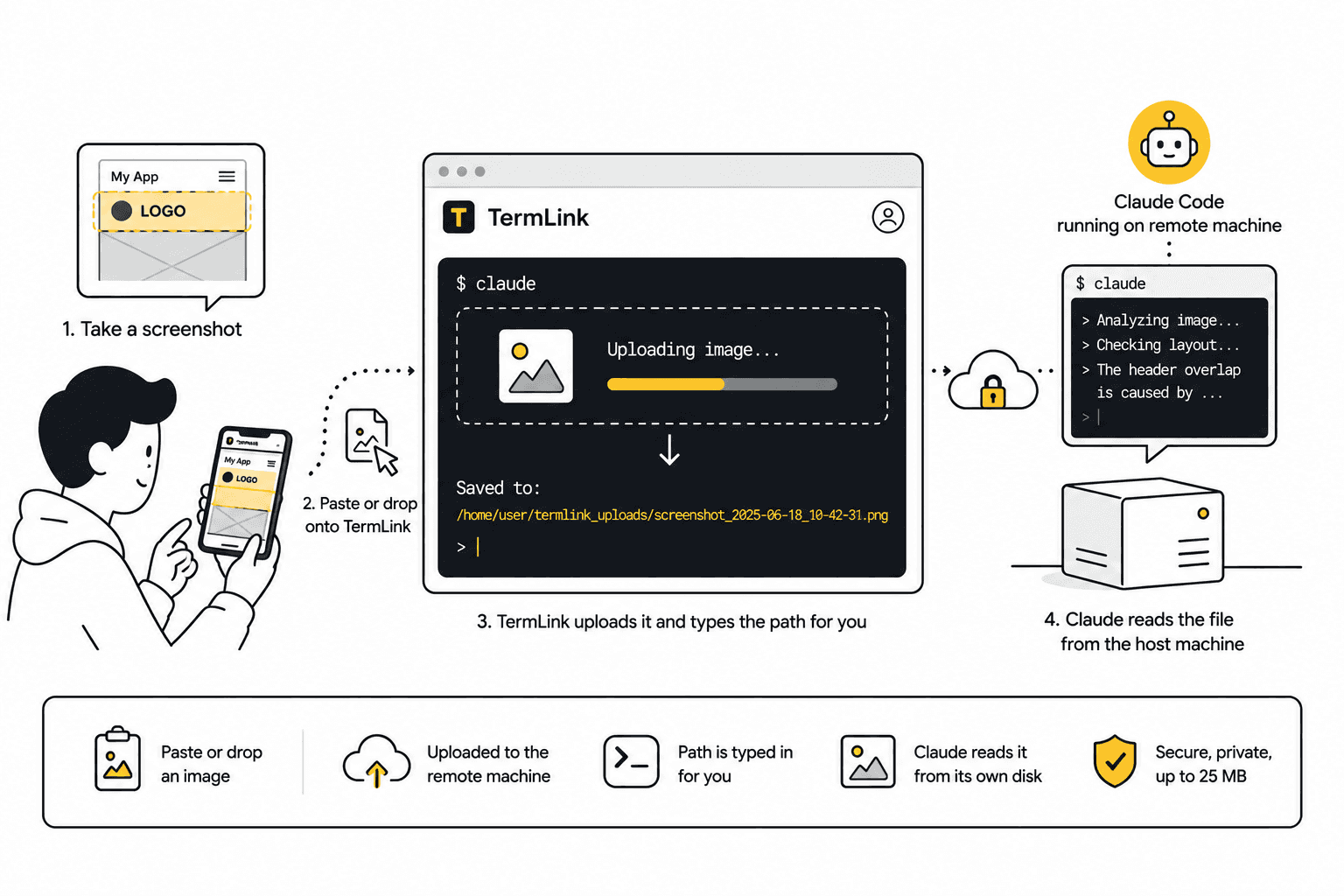
Paste from the clipboard or drop a file onto the terminal. TermLink uploads it to the machine the agent runs on and types the saved path in for you.
Some things are faster to show than to describe. A layout that is broken in a way you do not have the vocabulary for. A stack trace forty lines long. A design mock you want the agent to match.
Locally you would drop the file somewhere and tell Claude to look at it. The awkward part is doing that when the agent is running on a different machine and you are holding a phone.
Can Claude Code read images?
Yes, and there are two ways in.
Sitting at the machine it runs on, you can paste one straight from the clipboard. Anthropic's interactive mode reference gives the binding as Ctrl+V, Cmd+V in iTerm2, or Alt+V on Windows and WSL, and it drops an [Image #N] chip into the prompt that you can point at. Last checked October 1, 2026.
The other way is by path, the way any program opens a file. Claude Code is a process in a shell on some computer, so a file it reads has to be sitting on that computer's disk.
Both of those assume the clipboard and the disk belong to the machine you are at. The moment the session is somewhere else — a workstation at home, a box that only runs agents, anything you reached from a phone — your clipboard is not its clipboard, and the picture still has to cross. That gap is what the rest of this page is about.
Paste it, or drop it
Paste an image from your clipboard, or drag a file straight onto the terminal in the web client.
TermLink uploads it to the host — the machine Claude Code is actually running on — and then types the saved path into the prompt for you. Your next message just points at it:
> the mobile header overlaps the logo, see <the path TermLink just typed in>
Claude reads the file off its own disk, because that is where it now lives. There is no clipboard to bridge, no scp, no "put it in a gist and paste me the link."
Files up to 25 MB.
Why upload to the host and not to us
Because Claude Code is a program running in a shell on your machine, and the only file paths it can open are that machine's. Handing the agent a URL to somewhere else would just make it someone else's problem — and yours, when the link expires.
Putting the bytes on the host is the version that works with what the agent already is: a process with a filesystem.
It also means the image is subject to whatever you already do with that machine. It is not sitting in a third place you have to think about separately.
The phone case is the real one
This is a feature you appreciate away from your desk. You are looking at a bug on your phone — the app is misbehaving right there, in your hand. Screenshot it, open the TermLink tab, paste it onto the terminal, and tell the agent on your workstation to go look.
The alternative is remembering to do it when you are back at a computer, which means describing it to yourself in a note, badly, and losing the actual evidence.
More on the mobile flow in using Claude Code from your phone.
It works with other agents too
Nothing about the upload is Claude-specific. The file lands on the host and the path goes into whatever is reading input at the time — a prompt, an editor, another CLI agent.
TermLink relays a real terminal, so the image just becomes a path in it. That holds for Codex CLI and Cursor Agent the same way it holds for Claude Code, and for anything else you happen to be running in that shell.
Frequently asked questions
Can I paste an image into Claude Code?
Yes, when you are at the machine it is running on: Ctrl+V, Cmd+V in iTerm2, or Alt+V on Windows and WSL pastes from that machine's clipboard. What it cannot do is reach across machines, because the clipboard it reads is the local one. With TermLink you paste onto the terminal in the browser instead, the image is uploaded to the host, and the saved path is typed into the prompt.
How do I send a screenshot to Claude Code running on another machine?
Paste or drop it onto that machine's session in the browser. The upload goes to the host, not to your local disk, so the agent can open it immediately. You do not need SSH, scp, or a shared folder.
Does this work from a phone?
Yes. Take the screenshot, open the session in a mobile browser, and paste it onto the terminal. This is the case the feature exists for — the bug is usually on the phone, and the agent is usually not.
How large a file can I send?
Up to 25 MB.
Does it only work with images?
The upload puts a file on the host and types its path in, so the mechanism is not image-specific. Whether the agent can do anything useful with it depends on the agent.
Does it work with Codex CLI or Cursor Agent?
Yes. The file lands on the host and the path goes into whatever is reading input, so it does not depend on which agent is running. See the session manager for AI coding agents.
See getting started with TermLink to register the machine your agent runs on, or running Claude Code remotely for the setup this slots into.
TermLink keeps your agent running on your own machine and gives you the terminal from anywhere. Register a machine and open its session from any browser. Free plan, no card.