
A session manager for AI coding agents
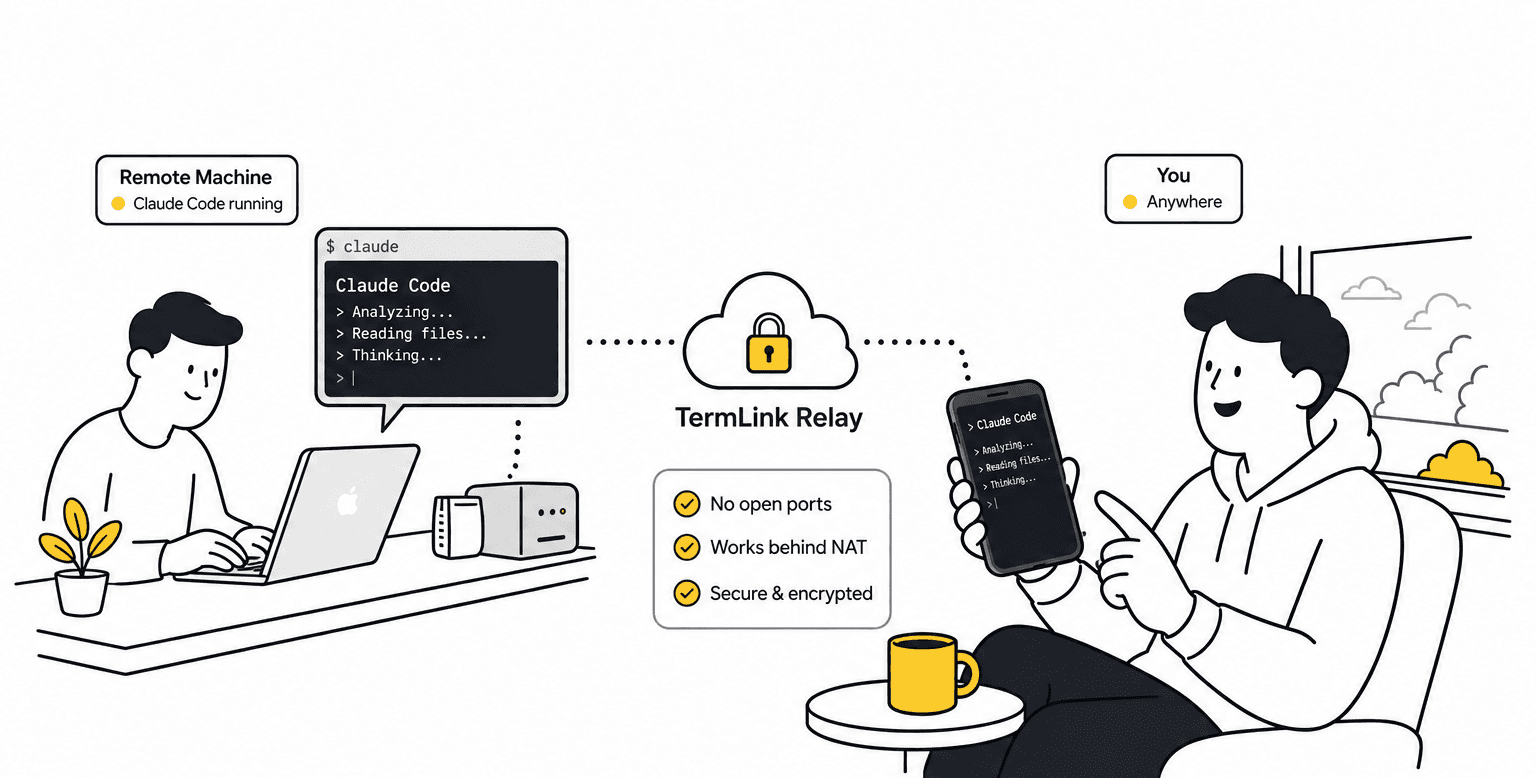
Your agents run on your own machines. TermLink puts them in one list you can open from any browser or phone — no SSH, no VPN, no open ports.
What is an AI coding agent session manager?
It is the place your running agents live, separate from the machine you happen to be sitting at. An agent works inside a terminal on some computer; a session manager keeps that terminal reachable, keeps several of them side by side, and tells you which one is waiting on you.
That last part is the one that matters once you are running more than one. Reaching a machine is a solved problem. Knowing which of your agents needs a human right now is not.
Which coding agents does TermLink work with?
Four, on by default: Claude Code, Codex CLI, Cursor Agent and GitHub Copilot CLI. Claude and Codex run through their own SDKs, Cursor and Copilot through the agent protocol server each of them ships.
Claude Code is the agent we support most closely and test the most. What recognising an agent actually buys you is set out on Codex CLI remote access.
You can also open a plain terminal session next to them, so the same list holds everything else you would do in one: running the test suite, reading a log, checking out a branch.
All four of those agents now ship a remote control of their own, each covering its own agent. What each one reaches, from their own docs.
How do I manage multiple coding agents at once?
Every machine you register shows up as a card in one list, and each card carries that session's most recent message from the agent. One line each. You read four lines and go to the one that needs you.
The machines do not have to be alike — a laptop, a workstation, and a box that exists only to run agents all sit in the same list. Neither do the agents: Claude Code on one, Codex on another.
Running several Claude Code agents at once, across machines walks through what that looks like in practice.
How does a remote AI coding agent work here?
The agent is never remote from your code — it is remote from you. It runs on the machine your repository is already checked out on, with your tools and your environment, and what travels to your browser is the terminal it is working in.
You run one command on that machine and it registers under your Google account by dialing out. From then on you open a remote coding agent terminal from any browser and you are looking at the real one, repainted as the agent left it.
The machine never accepts inbound connections, so there is no SSH port to expose, no key to distribute, and no VPN to dial into. See running Claude Code on a remote machine.
This is also the part people get wrong when comparing tools: hosted services run the agent on their infrastructure instead, which is a different trade — where that line falls.
Does the agent keep running when I close the browser?
Yes. The session lives in a terminal on your machine, not in the browser tab, so closing the tab does not interrupt the agent. Reconnect and the screen is repainted exactly as the agent left it, TUI and all.
The one requirement is that the host process keeps running. TermLink is not a background daemon like tmux — if you close the terminal the host is running in, the machine goes offline until you start it again.
What happens when Claude Code hits its usage limit?
The turn that stopped is sent again on its own, a minute after your plan's limit resets. You do not have to be at the keyboard when that happens, and you do not have to retype anything — until then the session shows a countdown to the retry, and it is there even if you reconnect hours later from another device.
TermLink reads the reset time from Claude Code itself, so the wait matches your own limit rather than a guess. Typing into the session cancels the wait and sends straight away.
The honest edges: this is Claude only for now, the stopped turn is resent once rather than retried forever, and the wait does not survive restarting the host — no conversation text is stored anywhere, so there is nothing left to resend after a restart. If Claude Code gives no usable reset time, the turn simply stays failed, the way it did before this existed. What happens when Claude Code hits its usage limit.
Can I stop the agent asking permission on every command?
Each session carries its own approval setting. Move it off Ask for everything and TermLink answers the approvals you allowed, so a long run does not sit blocked while you are away.
It starts at Ask for everything, and you can change it mid-run from a phone. A question the agent asks you is never answered for you, and neither is a plan waiting for your approval. The settings, and what a plain terminal session does instead, are on the Auto-Yes page. Treat it as a convenience rather than a safety feature: when to leave it off.
Does it work from a phone?
Yes. TermLink runs in a mobile browser and adds a control-key row — Esc, Tab, Ctrl+C, arrows — so a terminal UI is usable on touch. You can read what the agent is doing and answer its prompts.
You can also drop a screenshot onto the terminal: TermLink uploads it to the host machine and types the saved path in for your next prompt. See using Claude Code from your phone.
Which operating systems can host an agent?
macOS, Linux, and Windows. The client is any modern browser, including mobile.
On Windows the host uses cmd.exe by default, because PowerShell's PSReadLine swallows the Esc key that terminal UIs rely on — why that choice, and what it means.
Will it tell me when an agent needs me?
It can. Turn on notifications in Settings and TermLink raises a desktop notification when a session finishes a run or starts waiting for your input. They are browser notifications rather than push, so a tab has to be open somewhere, and there is no email. The list is the fallback either way: each machine card shows that session's latest message.
What does it cost?
There is a free plan. The plans differ in exactly one thing — how many sessions run at the same time. Free gives you four, Pro twelve at $9.99 a month, Max forty at $19.99.
The cap counts sessions, not viewers: you can watch them from as many browsers and phones as you like. Every active session streams live with no time limit on any plan.
Register the machine your code lives on, and open its session from anywhere.