
Claude Code remote access
Claude Code runs in a terminal on one machine. Remote access is everything that lets you reach that terminal from somewhere else — another laptop, a phone, a borrowed browser — while the agent keeps working where it is.
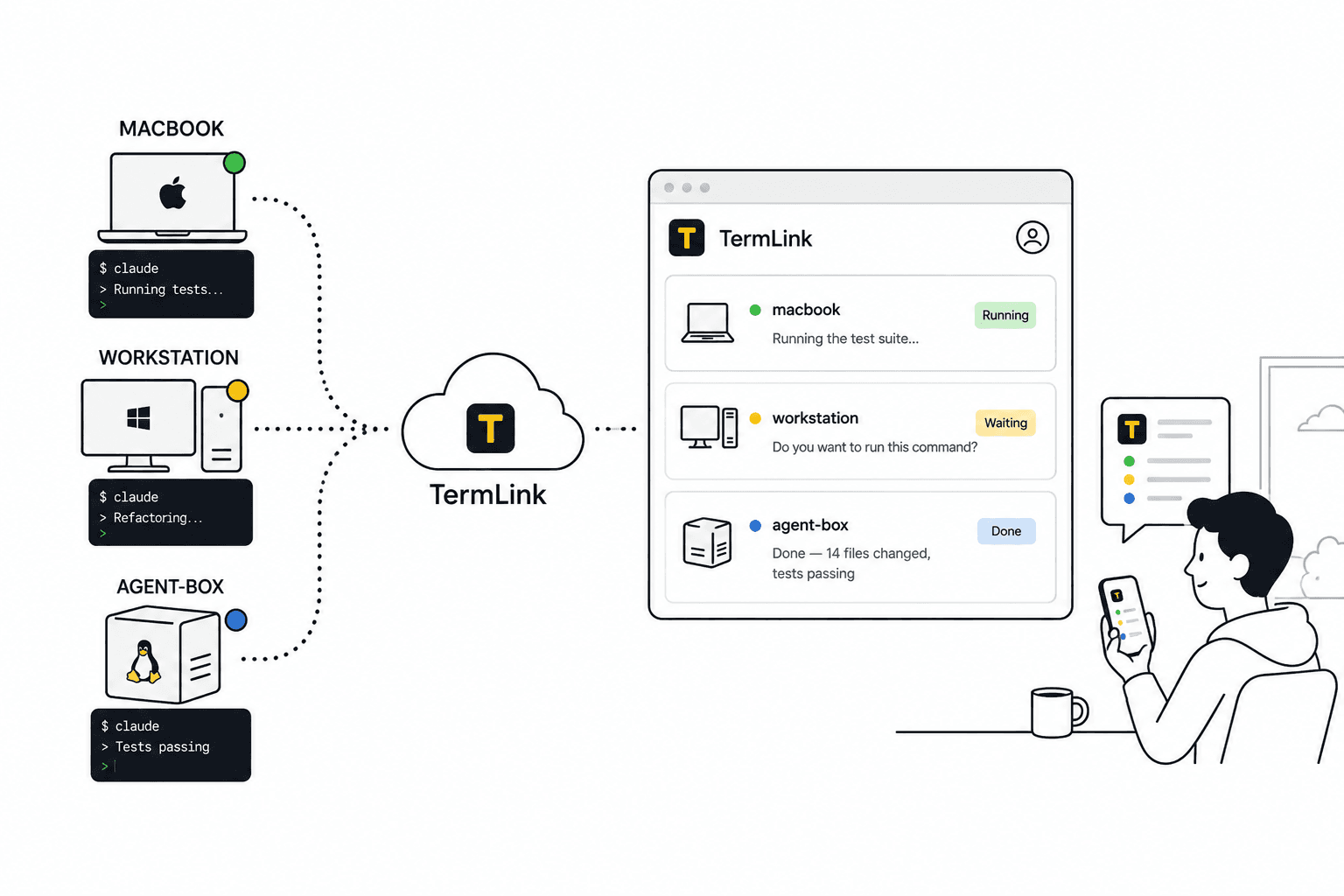
What is Claude Code remote access?
It is reaching a Claude Code session that is running on a machine you are not sitting at. The agent, its files, and its shell stay on that machine; what travels is the terminal.
That distinction matters more than it sounds. Claude Code is not a website you log into — it is a process holding your repository open on a specific computer. Remote access is not about moving the work somewhere else; it is about looking at it from where you happen to be.
With TermLink you run one command on the machine your code lives on, and from then on it is in a list you can open from any browser. See how a remote terminal works without SSH or a VPN.
Do I need SSH or a VPN?
No. Your machine opens an outbound connection to the TermLink relay and keeps it. It never accepts an inbound connection, so there is no port to open, no key to distribute, and no VPN to dial into.
This is also why it survives a laptop moving between networks — there is no address for anyone to reach. Compared with the alternatives in TermLink vs SSH, tmux, and remote desktop.
What the relay can and cannot see, and where your credentials sit on disk, is set out in how TermLink handles security.
Can I use Claude Code from my phone?
Yes. TermLink runs in a mobile browser and adds a control-key row — Esc, Tab, Ctrl+C, arrows — so a terminal UI is usable on touch. You read what the agent is doing and answer its prompts.
A phone is a bad place to write code and a good place to check on an agent, which is most of what a running session needs. More in using Claude Code from your phone.
Does Claude Code keep running when I close the browser?
Yes. The session lives in a terminal on your machine, not in the browser tab. Close the tab, lose your connection, put the phone in your pocket — the agent keeps going.
When you come back, TermLink repaints the terminal exactly as the agent left it, TUI and all. The one requirement is that the host process keeps running on the machine — TermLink is not a background daemon like tmux.
Walkthrough: running Claude Code on a remote machine.
Can I connect to multiple machines?
Yes, and this is the part most remote-access setups do not cover. Every machine you register shows up as a card in one list, each carrying that session's latest message from the agent.
A laptop, a workstation, and a box that exists only to run agents all sit in the same list. One glance tells you which one is working and which is waiting on you — see managing multiple Claude Code sessions.
Can I stop it asking permission on every command?
A Claude Code session carries its own approval setting, in the session header. Leave it on Ask for everything and it stops for each one; move it to Allow file edits or Allow commands and edits and it keeps going without you.
It is per session, starts at Ask for everything, and it is a convenience rather than a safety feature. A question the agent asks you is never answered for you, and neither is a plan it wants approved — how to stop Claude Code asking for permission every time covers when to leave it off.
Does it work on Windows?
Yes. Hosts run on macOS, Linux, and Windows. A Windows workstation is a perfectly good machine to leave an agent working on, and you can check on it from a Mac or a phone.
On Windows the host uses cmd.exe by default because PowerShell's PSReadLine swallows the Esc key that Claude Code relies on — running Claude Code on a Windows host.
How do I send a screenshot to a remote session?
Paste it onto the terminal, or drop the file on it. TermLink uploads the image to the host machine and types the saved path into the prompt, so your next message can just point the agent at the file.
This is the one that sounds like a detail and is not — the bug is usually on your phone and the agent is usually not. See how to paste an image or screenshot into Claude Code.
How is this different from Claude Code Remote Control?
Anthropic's own Remote Control reaches a Claude Code session on your machine from another device. TermLink relays the terminal rather than the agent, which is what makes several machines, a full shell, and other CLI agents possible.
Neither is a replacement for the other, and the honest version of the comparison is on its own page: TermLink vs Claude Code Remote Control.
Everything on Claude Code remote access
- Manage multiple Claude Code sessions
- Run Claude Code remotely
- Use Claude Code from your phone
- Stop the permission prompts
- Paste an image into Claude Code
- Claude Code on Windows
- vs Claude Code Remote Control
- A session manager for AI coding agents
- Is remote terminal access safe?
- Coding agent remote control, compared
- Codex CLI remote access
Register the machine your code lives on, and open its Claude Code session from anywhere. Free plan, no card.